CustomFrames weekly calendar with colour-coded family events, shown with sample data

Your family.
In one frame.

Photos, plans and everyday routines, together on the tablet you already own.

1 GB free per household. App launch coming soon.

Make room for family

A shared calendar, everyday routines and tonight's dinner. On the tablet you already own.

One calendar. Everyone.

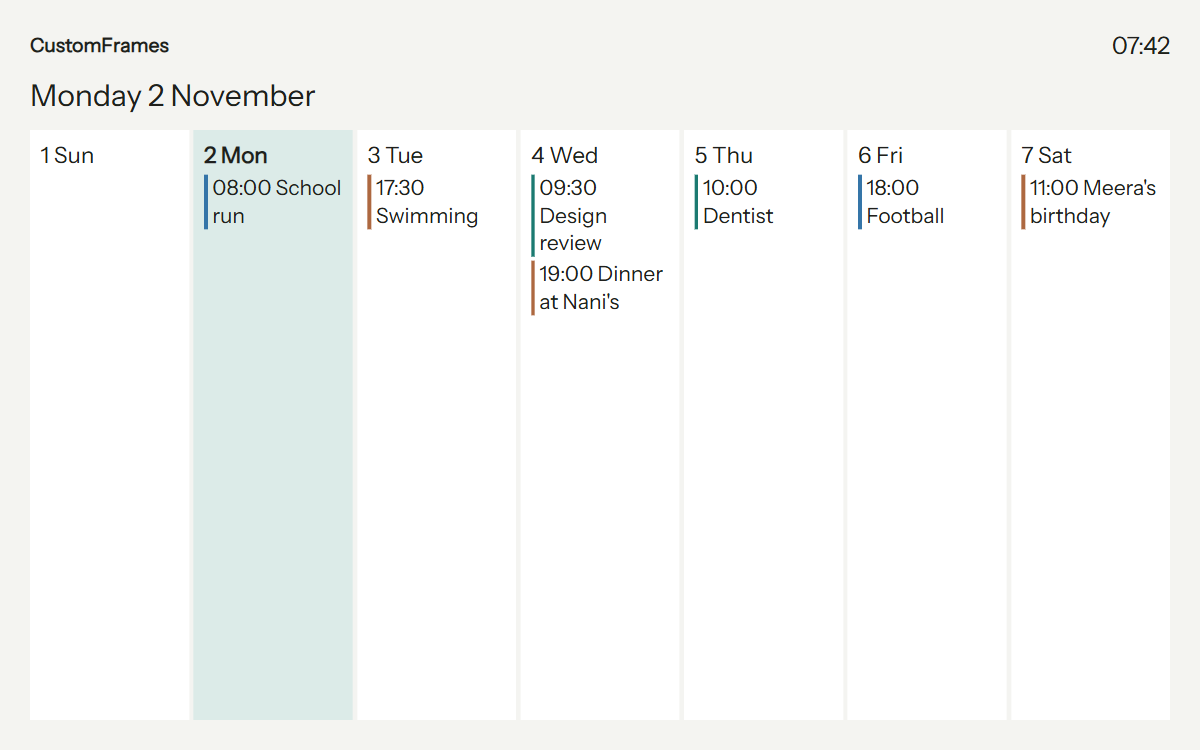
School runs, swimming, birthdays and appointments, colour-coded in one shared view. Add one-off or recurring events in the app and show them on your paired frame while connected.

Choose Day, Week, Month or Agenda from your phone or a touch-enabled frame. Filter people and calendars so each room shows what matters.

CustomFrames weekly calendar with colour-coded school runs, swimming, appointments and Meera's birthday
A sample week on the CustomFrames display. View full calendar.

Little jobs. Together.

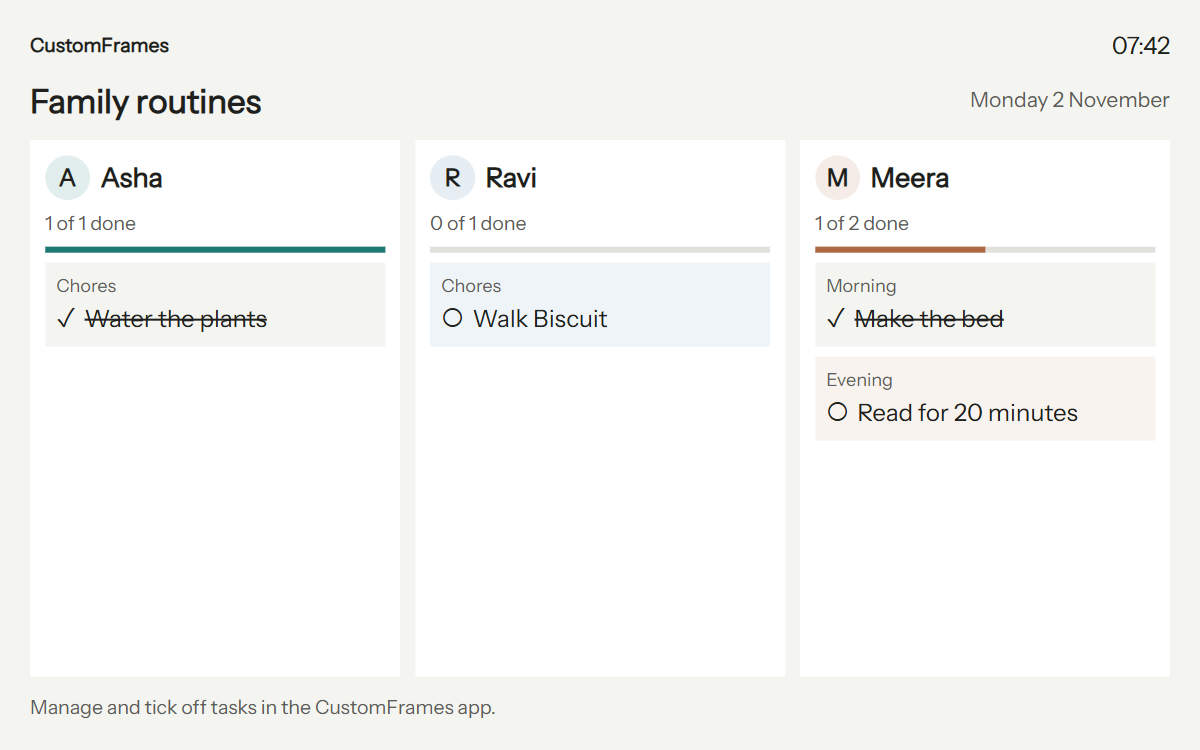
Give everyone a profile, colour and optional portrait. Assign chores and morning or evening routines, then see who has finished and what's still to do.

Tick off tasks on a touch-enabled display, or use your controller phone when the frame is out of reach or has no touchscreen.

CustomFrames routine board showing Asha, Ravi and Meera, completed chores and remaining tasks
Individual routines. A shared sense of progress. View full routines.

Effort earns a little joy

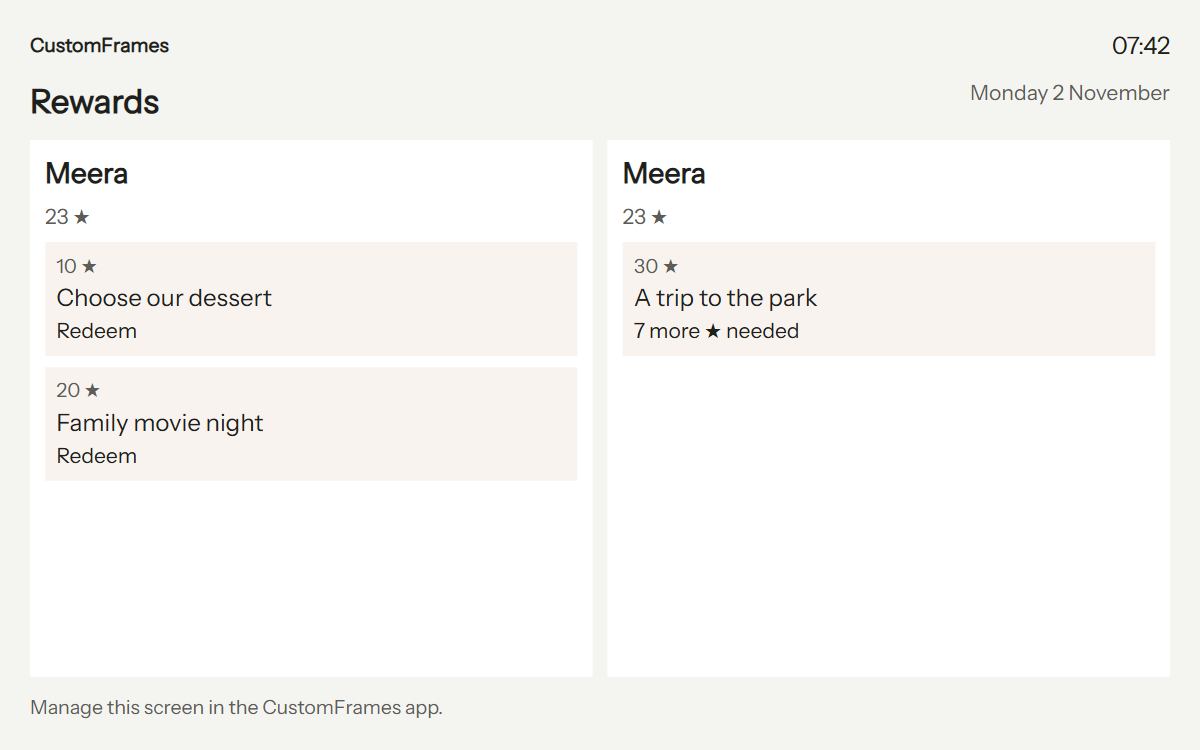
Award stars for completed tasks and set rewards your family cares about: choosing dessert, a movie night or a trip to the park.

See each person's balance, which rewards they can redeem and how many stars they still need.

CustomFrames rewards display showing Meera's 23 stars, two redeemable rewards and seven more stars needed for a park trip
Your family's rewards, at your family's pace. View full rewards.

What's for dinner?

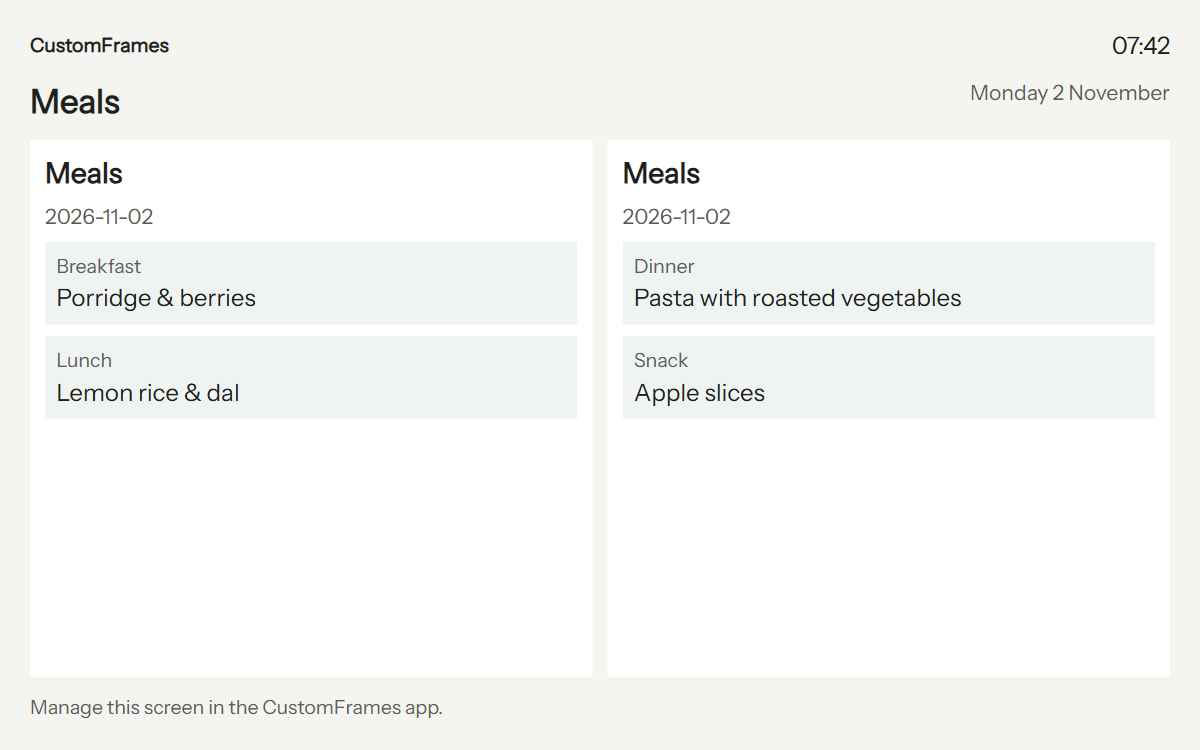
Plan breakfast, lunch, dinner and snacks, save recipes and keep shopping or to-do lists together. Everyone can see the plan without asking for your phone.

Add countdowns for birthdays and trips, and choose the people and information each display shows.

CustomFrames meal plan with porridge and berries for breakfast, lemon rice for lunch, pasta for dinner and apple slices for a snack
Today's meals, ready to see at a glance. View full meals.

Display previews use fictional family data. Try the interactive displays.

And there's more

Connect the calendars you use, share favourite memories and control every room from your phone.

Explore the interactive displays
Connect your calendars
Bring in Google and Microsoft calendars, school or club iCal/webcal feeds, and CalDAV accounts such as iCloud and Yahoo. Imported events are read-only; edit them with their original provider. App-created changes sync while connected, and linked calendars refresh periodically.
Photos & memories
Pick albums and favourites for each frame. Show captions, adjust crop and rotation, pair portrait photos side by side, and choose slideshow transitions. Rediscover photos from this day in earlier years. Supported displays can play Live Photo motion and short clips, with optional sound.
Share with your household
Invite relatives with Administrator, Editor, Contributor or Viewer access. Let guests submit photos through expiring upload links with limits and optional approval. Add selected photos from Google Photos or public iCloud shared albums; these imports currently copy photos into your household library.
Control every screen
Pair by QR or manual code. Select content, schedules, calendar views, brightness and quiet hours from the app, including for non-touch displays. Use native foreground keep-awake or browser playback with device sleep settings. Cached photos can keep playing through a connection interruption; browser offline reload is not guaranteed.
Beyond the family calendar
Show scheduled announcements, branded slides, meeting-room availability, weather and countdowns. Switch between photos, Calendar, Family and office layouts, with display schedules and settings for each frame. The app supports 12 languages.
Optional connected tools
With the service configured, review AI suggestions from pasted text, photos or PDFs for events, chores, lists, meals and more before saving. Announcement templates work without AI; optional AI drafts need review. Email photo intake, SMS/MMS and desktop screen sharing require their own provider or network setup. Native scanning and system sharing require supported devices and builds.

16:05Iceland, last summer · added by Ravi
Week of 9 JuneEveryone
Mon908:00School run
Tue1017:30Swimming
Wed1109:30Design review19:00Dinner at Nani's
Thu1210:00Dentist
Fri1318:00Football
Sat1411:00Meera turns 9
Sun1509:00Park run
Today's routines11 of 16 done
AAsha
12 starsWater plantsOrder groceriesPay school fees
RRavi
9 starsBins outWalk BiscuitFix the gate
MMeera
23 starsMake bedFeed BiscuitReading, 20 minPack swim bag
NNani
7 starsCall MeeraEvening walk
ReceptionWed 11 June · 09:12
Welcome, Priya. She joins the design team today.Say hello on the third floor · until 18:00
Board roomIn use until 10:00
Garden roomFree until 14:00
LunchLemon rice and dal
Outside24° sunny

One frame, eight displays

Albums you choose for each frame, favourites twice as often, and clips with their sound. Crossfade, Fade through black, Slide or Drift, at the speed you pick.

  • Photos
  • Calendar
  • Office board
  • Family routines
  • Lists
  • Meals
  • Countdowns
  • Rewards

Pages turn every 15 seconds, and each display can have its own hours.

Settings a family uses

Each frame keeps its own settings in the app. Try a few; this is what they change.

Bring back photos from this day.

Photos taken on today's date come round three times as often, with a note such as “On this day · 3 years ago”.

Show the week at breakfast.

Calendar from 06:30 to 09:00 on weekdays, then back to photos. Up to 14 days ahead on the screen remote.

Dim the screen through the night.

Black from 22:00 to 06:30, sound muted, and the morning schedule picks up by itself.

Let the cousins add photos by link.

A guest page in 12 languages, with an expiry, a photo limit and your approval before anything plays.

Set two portraits side by side.

Tall photos share one landscape screen instead of sitting small between black bars.

Reuse your old tablet

Welcome
How will you use this device?
ControllerFrame

Open the app or web app on your old tablet. Choose Frame.

Pair this frame Waiting
K7QM 4XRT
Expires in 9:41

Then it shows an eight-character code and a QR.

Kitchen frame Paired
Shows photos fromFamily, Holidays
PeopleARM
TransitionCrossfade · Gentle
Birthday cake photo in the Family album Picnic photo in the Holidays album Mountain photo in the Holidays album

Choose Controller on your phone. Scan the QR or enter its code.

Kitchen frame Online
Now showingPhotos
Last sync5 s ago
Night22:00 – 06:30
BatteryCharging · 86%

Keep it powered. For browser playback, adjust screen sleep. Manage it from your phone.

Free

For a household starting with the screens it already has.

1 GB of photos and clips shared by the whole household, and every frame you pair. The calendar, chores, lists, meals, guest links, the screen remote and 12 languages are all included. No card, and nothing is charged.

$0per household

See free setup

Bring your own cloud

For people who already keep albums in Google Photos or iCloud.

Frames show the albums you keep with your own cloud provider; we hold only the photos on show, up to 1 GB. Everything in Free is included. Or $47.90 a year, 20% less. Coming soon, so there is nothing to buy today.

$4.99a month

Photos 100 GB

For families whose albums outgrow 1 GB.

100 GB in total for the household, backed up on our servers. Everything in Free is included. Or $95.90 a year, 20% less. Not on sale yet, so there is nothing to buy today.

$9.99a month

Fair questions

What works today, and what you set up yourself.

Can I reuse an old iPad or Android tablet?

Yes, if it can run the current CustomFrames app or a supported modern browser over HTTPS. Phones can be frames too. Choose Frame on the display and Controller on your everyday phone. Older devices with unsupported operating systems or browsers may not work; age alone does not guarantee compatibility. No custom OS or flashing is required.

Will the screen stay on by itself?

The native app keeps the screen awake while Frame mode is displaying in the foreground. Browser wake lock is best effort: keep the tab visible and adjust screen-sleep settings on the device. Fullscreen support varies by browser. For a dedicated display, use Guided Access on iPhone and iPad or screen pinning on Android. Use a sound battery, a suitable charger and a ventilated stand; do not reuse a device with a swollen or damaged battery.

Can I try it without installing an app?

Yes. Open the published CustomFrames web app in a supported browser on your tablet and choose Frame. Pair it from your phone using the QR or manual code. This marketing page is not the frame player. Browser controls cannot guarantee that the operating system keeps the screen on, and clearing site data removes the browser's pairing.

What happens when the Wi-Fi drops?

Cached photos can continue playing, with a cache of up to 256 MB. Browser storage may be cleared by the device, and reloading a browser frame offline is not guaranteed. Touch-screen changes are queued locally and sent when the connection returns.

Do iPhone photos work?

Yes. HEIC photos are converted to JPEG as they are added, so every frame can show them. Live Photos and short clips play too, with sound if you turn it on for that frame.

Is this a family calendar as well as a photo frame?

Yes. Choose Day, Week, Month or Agenda and give each person a colour. Add recurring events, connect Google or Microsoft calendars, subscribe to school and club iCal/webcal feeds, or use CalDAV accounts such as iCloud and Yahoo. Chores, rewards, lists, meal plans and countdowns make the tablet a family planning hub too. CustomFrames is an independent product, not a Skylight integration, and does not claim every Skylight feature.

Who in the family can change things?

You invite people by email and give each one a role: Administrator, Editor, Contributor or Viewer. Grandparents can add photos without being able to change a frame's settings.

Will I be charged after a trial?

No. The 1 GB household allowance is free and nobody is charged automatically. The paid plans, Bring your own cloud at $4.99 a month and Photos 100 GB at $9.99 a month (20% less when paid yearly), are not on sale yet.

Is there a CustomFrames picture frame to buy?

Not yet. Dedicated wall frames are in development; today CustomFrames runs on the phones, tablets and browsers you already own. Builders can follow that work in the hardware handbook, linked at the foot of this page.

Give your tablet a purpose

Start with the tablet you already own. Choose Frame on it, then use your everyday phone as Controller to add photos, calendars and routines.

Plan your tablet setup

The app is not published yet. This is a setup preview; it does not pair a device or create an account.

Use it as

In the app, “Kitchen frame” would show a pairing code to scan from your phone.

Display preview

Scroll across to see the whole display. These previews use fictional family data.